Fill SIR Form: The Election Commission of India (ECI) digitally manages the Special Intensive Revision (SIR) form, making it simpler for voters to update their electoral roll information online via the official webpage or by submitting it to BLO. The digital submission method is simple, only requiring the identification of a mobile device with the EPIC card. If voters are unable to access online services, they can submit forms offline through the BLO. Recent changes highlight the need to verify Aadhaar data for identity validation prior to final submission. Complete SIR or Enumeration Form Process given below.
यूपी में एसआईआर के लिए बढ़ सकता है एक सप्ताह का समय
SIR फॉर्म भरने की जान लें पूरी प्रक्रिया
| Detail | Description |
|---|---|
| Administered by | Election Commission of India (ECI) |
| Purpose | Electoral roll update and revision |
| Submission Method | Online via official portal or offline through BLO |
| Verification Requirement | EPIC card linked mobile number, Aadhaar e-sign verification |
| Official Website | voters.eci.gov.in or respective state CEO websites |
| Last Date to Apply | Specified on official state election commission portals |
How to fill SIR Form and Submit SIR Form to BLO?
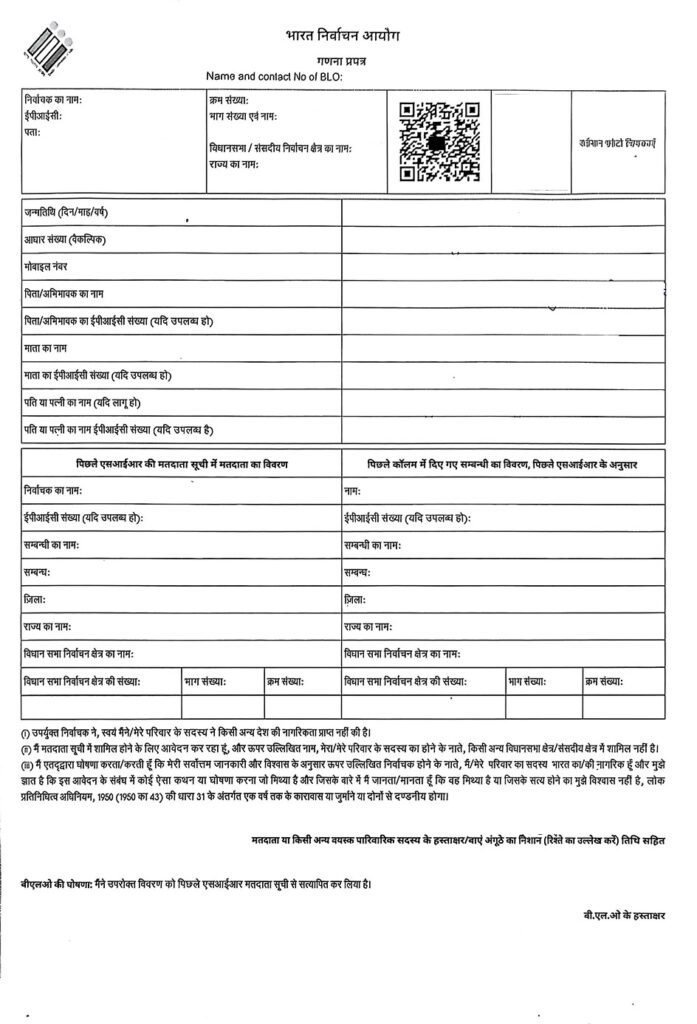
People are confused about how to fill out the SIR form, although it is not a difficult process. If you have already a Voter or Name in previous election Electoral Voter List.
Then visit your polling station BLO Office or BLO visit your home. Your Polling Booth Station BLO will provide SIR (Special Intensive Revision) Form or Enumeration Form.
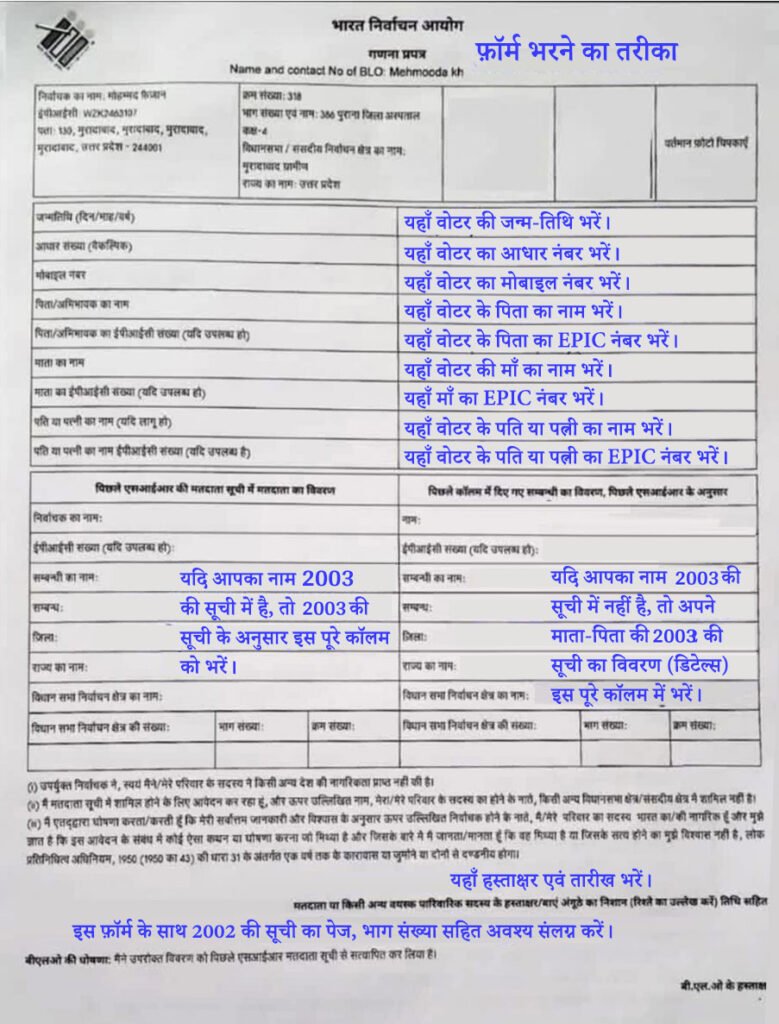
In the Next Step, you will fill the SIR Form or Enumeration Form by you or BLO itself.
There are three types of situations that you will face while filling the SIR Form.
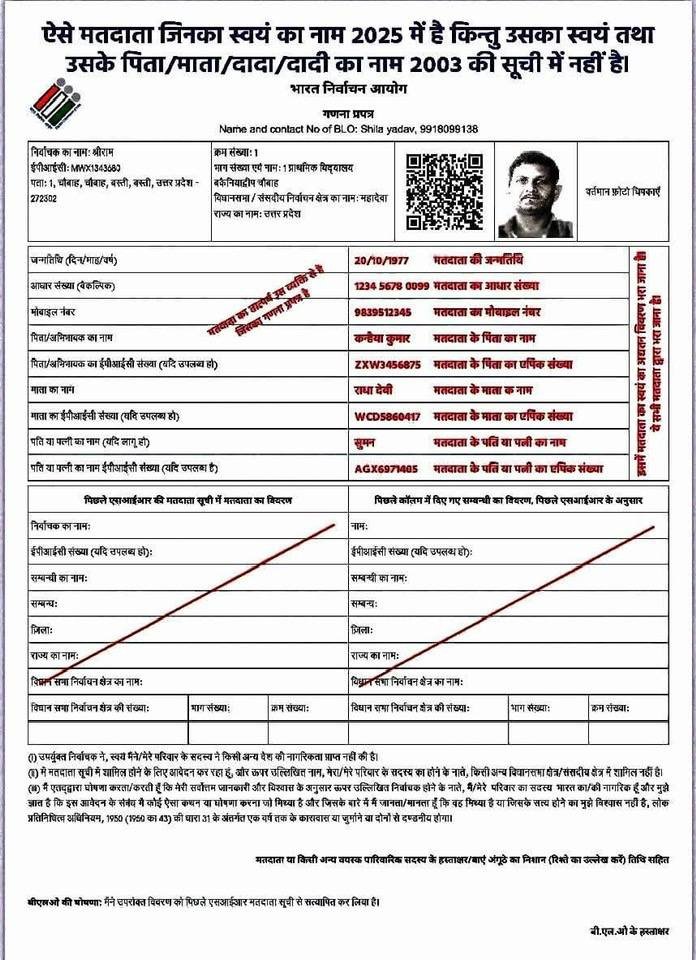
ऐसे मतदाता जिनका स्वयं का नाम 2025 में है किन्तु उसका स्वयं तथा उसके पिता/माता/दादा/दादी का नाम 2003 की सूची में नहीं है।
Such voters whose own name is in the 2025 list but his own and his father/ mother/ grandfather/ grandmother’s name is not in the 2003 list.
Simply fill in the columns, such as
- the date of birth in the first column,
- the Aadhaar number (optional) in the second column,
- the mobile number in the third column,
- the father/guardian’s name in the fourth column, and
- the father/guardian’s EPIC number (if available) in the fifth column. (This number is written on the top of the voter ID card.)
- the sixth column contains the mother’s name,
- and the seventh column contains the mother’s EPIC number, which is listed on the mother’s Aadhaar card or is optional. If you don’t have the information, you can skip this column.
- The seventh column contains the husband’s or wife’s name, if you are married. Otherwise, you can skip this column.
- The eighth column contains the EPIC number, if you have a husband or wife.
OR
ऐसे मतदाता जिनका स्वयं का नाम 2025 व 2003 की सूची में है।
Such voters whose own name is in the list of 2025 and 2003
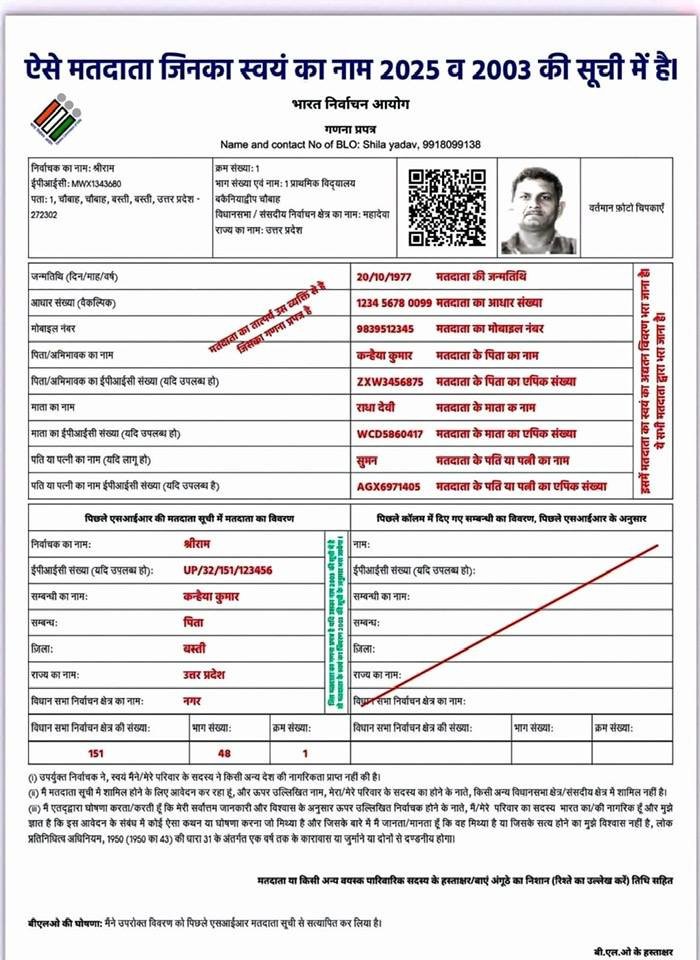
OR
As you proceed, you’ll see the constituency name, where you can enter your name in Previous SIR 2002, 2003 or 2004 Data.
How to search your name in last SIR 2003 Voter List
- First enter voter name.
- You must enter your voter ID card number in the EPIC number.
- In the next column, you must enter the relative’s name and relationship.
- Then, you must enter the district and state.
- In the next column, enter the name of the assembly constituency, followed by the part number, serial number, and assembly constituency number in the next column. This completes your form.
ऐसे मतदाता जिनका स्वयं का नाम 2003 की सूची में नहीं है किन्तु उनके पिता/माता/दादा/दादी का नाम है।
Voters whose own name is not in the 2003 list but the name of their father/ mother/ grandfather/ grandmother is there
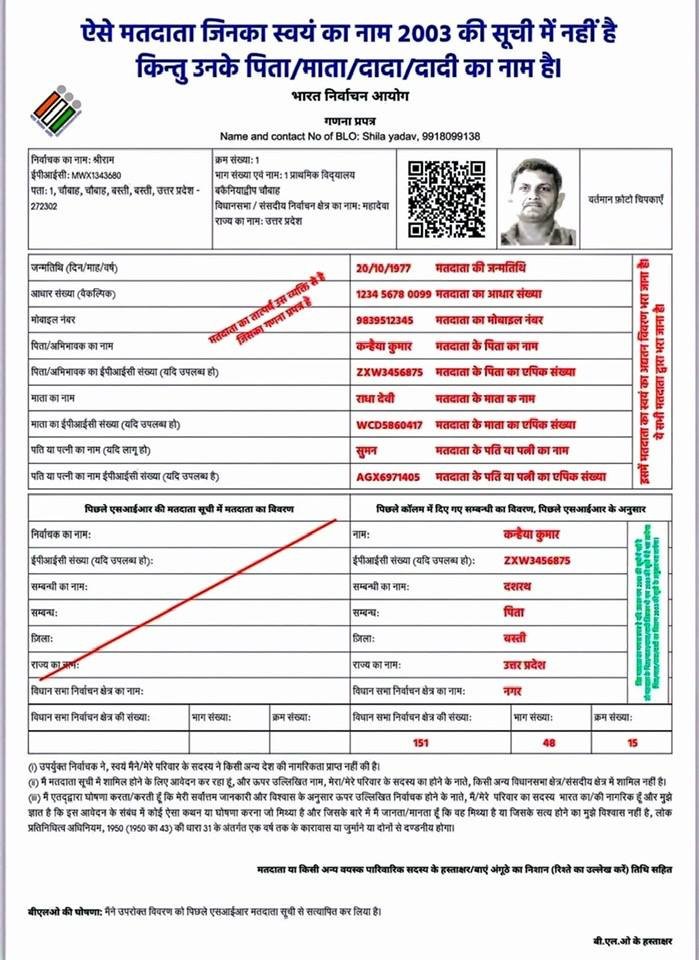
As you proceed, you’ll see the constituency name, where you can enter your name and relative name (Father’s, Mother’s Name).
- First enter your relative name (Father’s, Mother’s Name).
- You must enter your voter ID card number in the EPIC number.
- In the next column, you must enter the relative’s name (Father’s, Mother’s Name) and relationship.
- Then, you must enter the district and state.
- In the next column, enter the name of the assembly constituency, followed by the part number, serial number, and assembly constituency number in the next column. This completes your form.
You can complete this form by placing a photo of yourself next to the photo column above.
Next, Signature/Left Thumb Impression of Elector or Any Adult Family Member (mention relationship) with date.
Finally, BLO Review your application and Signature by BLO.
Handle deletions (if any)
If a listed family member dies, have the death certificate ready for the BLO so that the name can be removed from the rolls.
Please submit and keep a copy. Keep one completed form for your records. When they return, they should bring the other to the BLO. Save the BLO’s contact information for further follow-up.